Lorem ipsum dolor sit amet, consectetur adipiscing elit. Cras sed consequat nulla. 12
Course list: http://www.c-jump.com/bcc/
Disk Drive Terms and Concepts
- Disk and Memory Working Together
- Disk Drive Basics
- Disk Drive Tracks
- Disk Drive Cylinders
- Disk Drive Sectors
- Disk Drive Terminology
- Calculating Disk Capacity
- How sectors are really numbered on a drive?
- Regular CHS Mode
- Extended CHS, ECHS Mode
- ECHS Example
- Zone Bit Recording
- Variable Sectors per Track
- Logical Block Addressing
- CHS vs. LBA
- Sectors and Clusters
- Logical vs. Physical File Size
- Hard Drive Interfaces
- HPA, Host Protected Area
- DCO, Device Configuration Overlay
- Hard Disk Data Acquisition
- Hard Disk Data Acquisition, cont
- Hard Disk Data Acquisition and BIOS
- Hard Disk Data Acquisition
- Live Acquisition
- Write Blockers
- Removable Media
- CD-ROMs
- RAID, the Multi-Disk Volumes
- RAID Level 0, 1, 2
- RAID Level 3
- RAID Level 4
- RAID Level 5
- Software RAID
- Disk Spanning
- RAID Forensic Analysis
- Damaged Data Units
- Damaged Data Units, cont.
1. Disk and Memory Working Together
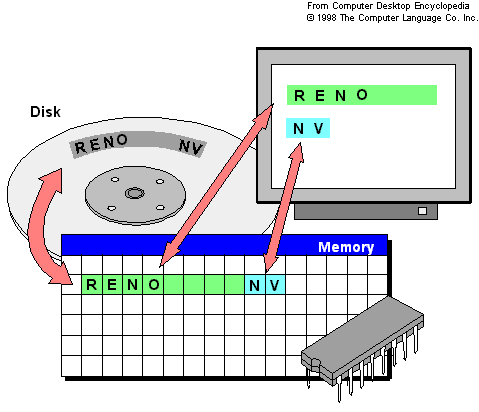
- On disk, data stored in sectors
- Sector typically holds 512 bytes of data
- Sector is the smallest unit that can be read or written
- Memory is holding bytes of data
- Each byte in memory can be accessed independently
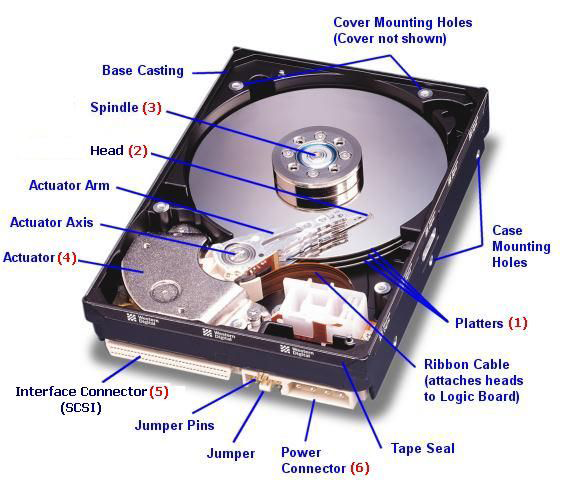
2. Disk Drive Basics
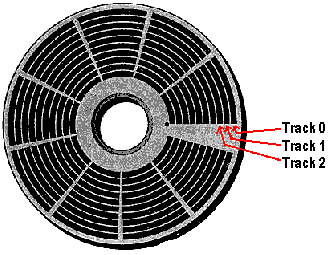
3. Disk Drive Tracks
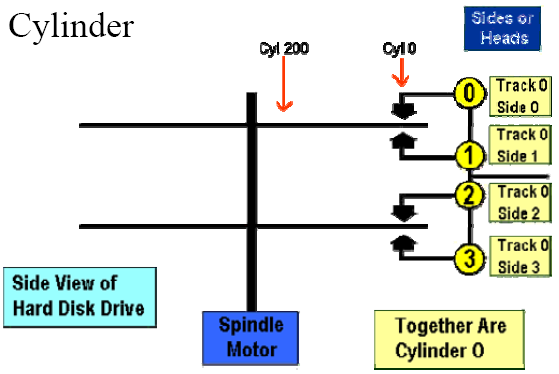
4. Disk Drive Cylinders
5. Disk Drive Sectors
- Note: Sector ize is usually 512 bytes long:
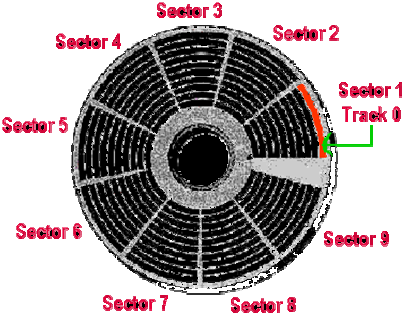
6. Disk Drive Terminology
- Putting it all together:
- Number of cylinders (tracks), heads (sides), and sectors (aka CHS) uniquely identify the physical geometry of the storage units on a disk
- CHS also yields disk capacity:
- Capacity = Cylinders × Heads × Sectors × sector_size
7. Calculating Disk Capacity
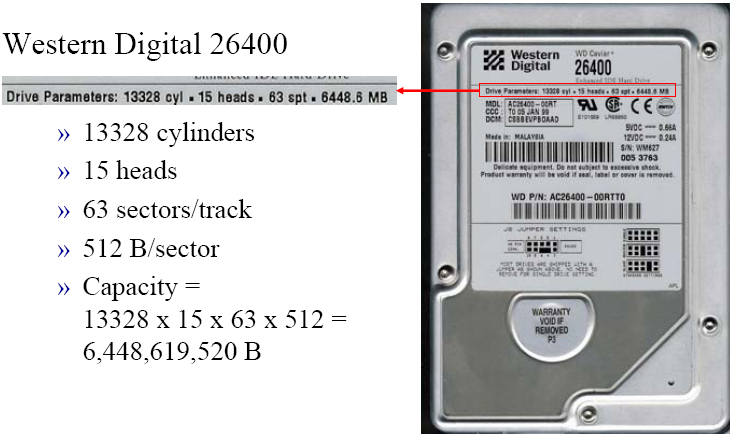
8. How sectors are really numbered on a drive?
- Did that drive really have 15 heads?
- Could 8 platters really fit in that less than 1 inch space?
- CHS = 13,328/15/63 is the reported geometry.
- That is, this is what it says on the drive!
- Let’s see what the real geometry is…
9. Regular CHS Mode
- Designed for early IDE/ATA HDDs
- C <= 1,024
- H <= 16
- S <= 63
- This mode works for drives up to 504 MB in capacity
10. Extended CHS, ECHS Mode
- ECHS is used for drives between 504 MB and 8 GB
- CHS addressing is limited to
- 10 bits for cylinder (<=1024)
- 8 bits for head (<=256), and
- 6 bits for sector (<=63 since first sector is 1.)
- CHS addressing is limited to
- In ECHS, the actual C value is divided by 2 and the H value multiplied by 2 until:
- C < 1024 or H >= 255
11. ECHS Example
- Reported CHS geometry = 18,383/16/63
- Capacity = 9,487,392,768 B (9 GB)
- In fact, this drive might very well have two platters (i.e., 4 heads)
- True geometry is CHS = 73,532/4/63
- The translation is handled by the disk drive controller
12. Zone Bit Recording
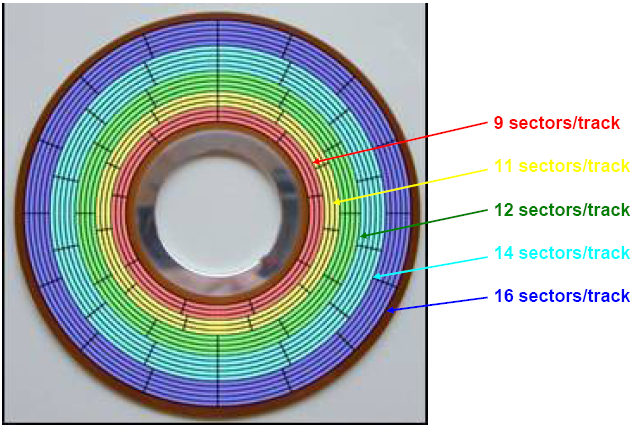
- On small (<=8GB) drives, every track has the same number of sectors
- The outside tracks are less densely packed with bits than inside tracks
- ZBR allows a variable number of sectors/track
- Enabled due to sophisticated electronics built into HDD controller
- Allowed manufacturers to optimize the disk surface and build higher-capacity drives
- CHS values no longer represent actual geometry
13. Variable Sectors per Track
14. Logical Block Addressing
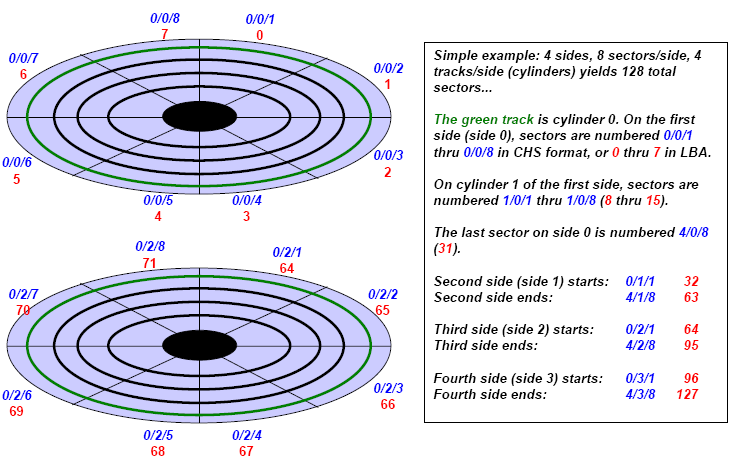
- LBA is an absolute sector addressing scheme used by ZBR
- First sector is 0
- The hard drive controller translates LBA (physical geometry) into CHS addressing (logical geometry) used by the operating system and BIOS
15. CHS vs. LBA
Lorem ipsum dolor sit amet, consectetur adipiscing elit. Cras sed consequat nulla. Curabitur non dui nulla. Curabitur interdum volutpat
Lorem ipsum dolor sit amet, consectetur adipiscing elit. Cras sed consequat nulla. Curabitur non dui nulla. Curabitur interdum volutpat